
Account Takeover Monitoring: How to Watch Breach Dumps and Stealer Logs for Your Domain, in Real Time
Account takeover monitoring means watching for your organisation's email addresses in newly surfaced breach dumps, combolists, and stealer logs, and acting on that exposure before anyone tests it against your logins. It is domain-level work, not login-page work. You register the domain once, every address under it is covered, and the alert tells you which addresses appeared, in which breach, with what data types, so the reset lands on the right accounts the same day. As of September 2026 our catalog holds 781 breaches and 11.61 billion records, and 780 of the 781 include email addresses.
The short version
- A takeover starts with an address in someone else's breach, weeks or years before anyone touches your login page.
- Monitor the domain, not a list of people. Former staff, aliases, and service accounts are the addresses nobody remembers to add.
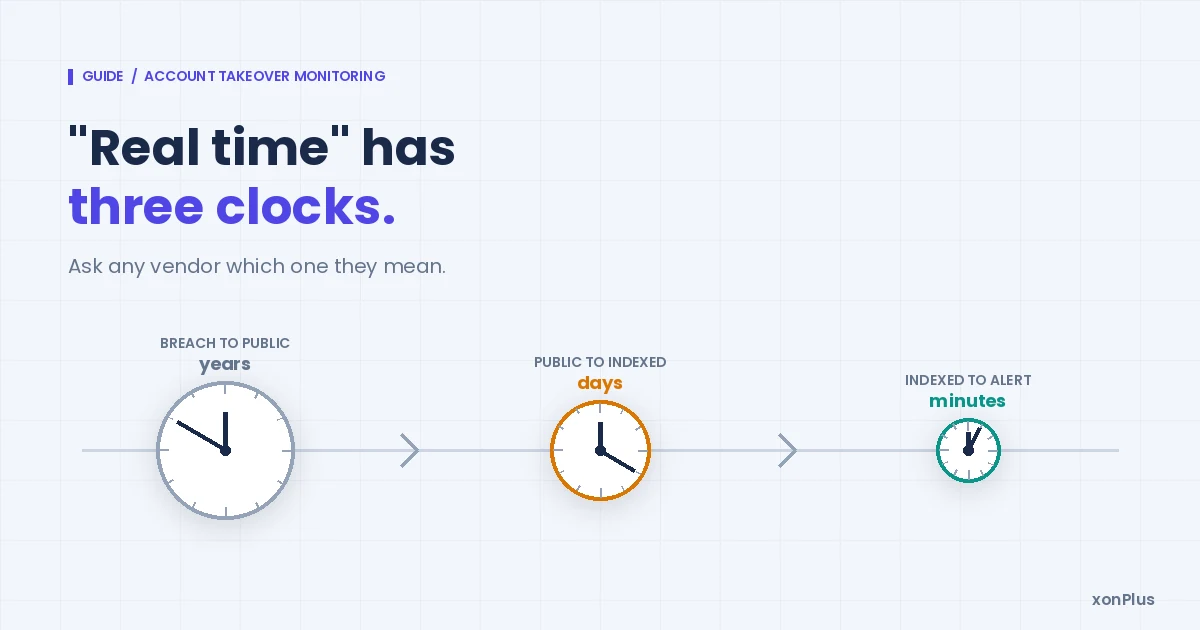
- Three clocks run at different speeds: breach to public (median 1,591 days across our catalog), public to indexed (24 to 72 hours), indexed to alert (minutes). Ask any vendor which clock they mean.
- The alert is a work item. Reset the listed accounts, step up authentication on the ones that matter, and keep the record.
Where a takeover actually starts
Not at your login page. Somewhere else entirely, usually a service your staff signed up to with a work address and then forgot about.
The chain has three links. An address and its credentials leak in a third-party breach, or get lifted off an infected laptop by stealer malware, or get bundled into a combolist assembled from older leaks. Then someone tests those credentials against logins that matter: email, VPN, SaaS admin panels. If a password was reused, the third link closes. The account is theirs, and to your logs it looks like a normal sign-in.
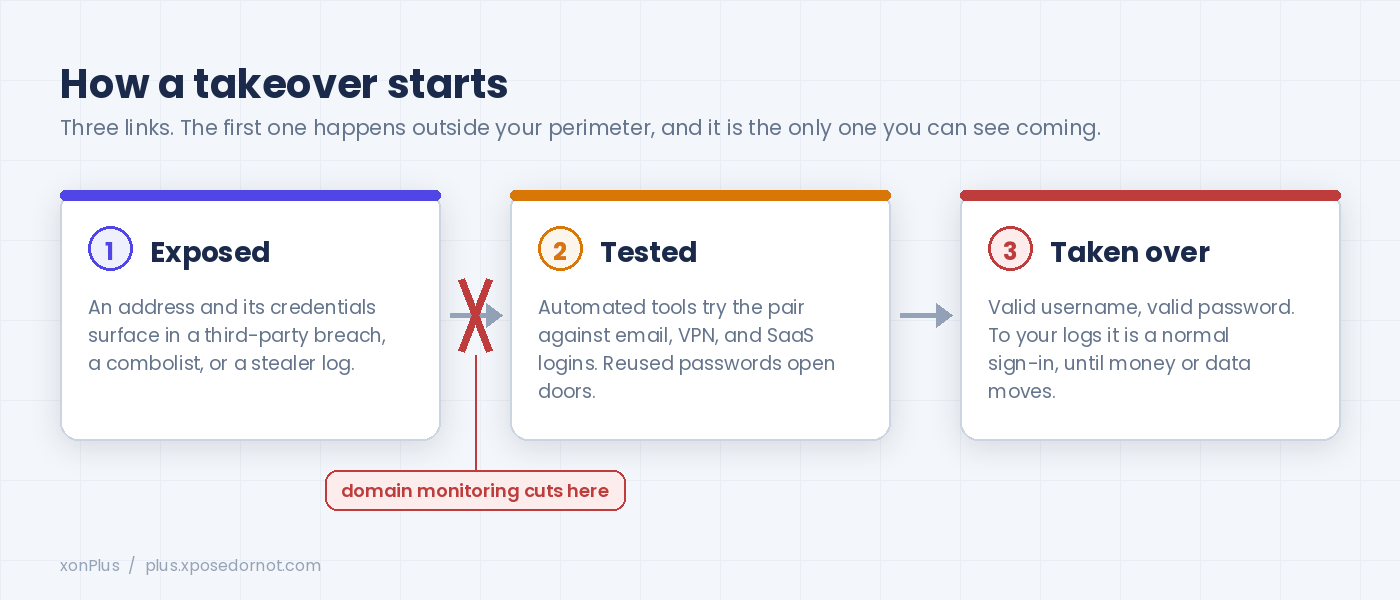
The supply behind link one is large and it is not shrinking. As of 3 September 2026 our catalog records 11,612,628,963 exposed records across 781 breaches, and 123 of those breaches were added in 2026 alone. Records, not people: one person's address appears in many of them. What turns up next to the address decides what an attacker can do with it.
| Data type | Breaches listing it (of 781) |
|---|---|
| Email addresses | 780 |
| Passwords | 516 |
| Names | 407 |
| Usernames | 393 |
| Phone numbers | 276 |
| IP addresses | 275 |
Counted from the exposedData field on 3 September 2026.
If you are picturing this as only the big headline breaches, adjust the picture. By count our catalog is 774 conventional breaches, but the handful of combolist and stealer-log entries carry a disproportionate share of the lines: the single stealer-log entry we hold is 299,646,818 unique addresses on its own, and it reached us in June 2026. A breach is one company. A stealer log is one infected machine's saved logins: work and personal in the same file. We wrote up what that does to alert volume for MSSPs, and the free blog has the plain-language taxonomy of dump, combolist, and stealer log if your team needs the vocabulary first.
What "real time" means, and what it cannot mean
Every vendor in this category says real time. Almost none of them say which clock.
There are three, and they run at wildly different speeds.
| Clock | What it measures | What we see |
|---|---|---|
| Breach to public | The day the data was taken, to the day it surfaces where anyone can index it | Median 1,591 days across 776 catalog entries, measured breach date to catalog entry, so it includes the indexing leg below (August 2026) |
| Public to indexed | The data surfacing, to it being searchable in our catalog | 24 to 72 hours for most sources |
| Indexed to alert | A new entry landing in the catalog, to your domain's alert going out | Minutes |
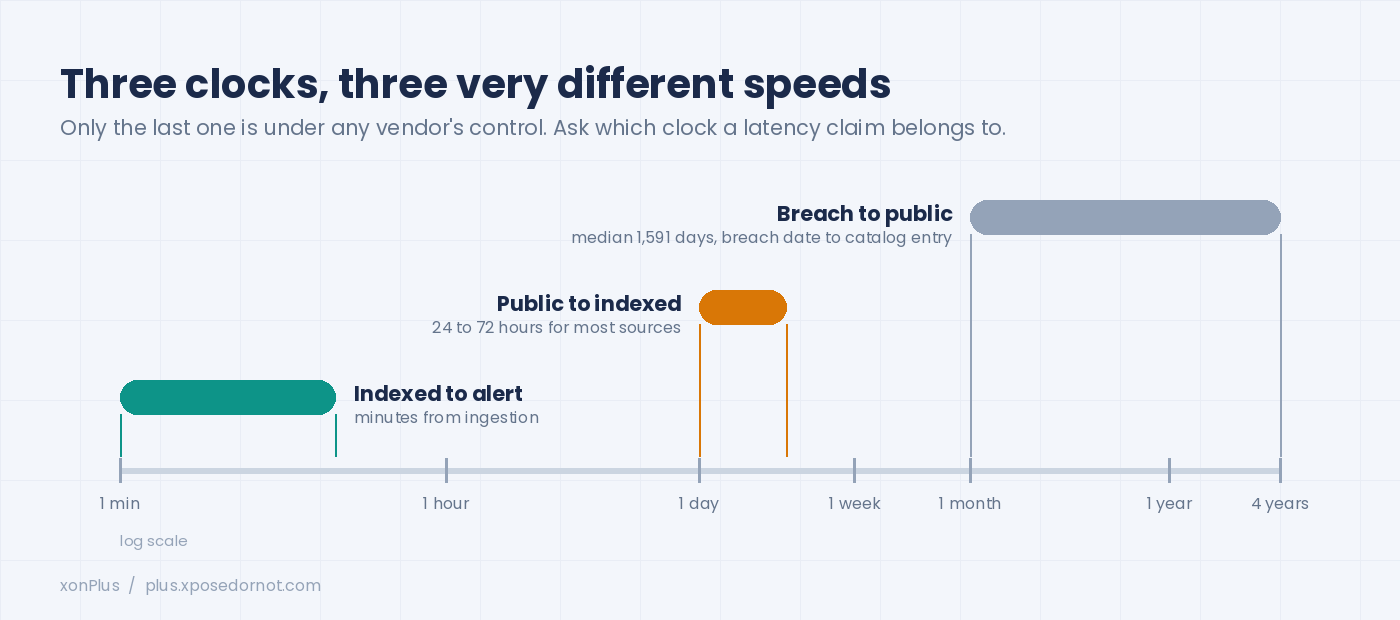
The first clock is the humbling one. Our own disclosure-lag analysis puts the median gap between a breach happening and its data landing in our index at 1,591 days. More than four years. No monitoring product shortens that; the data simply was not available to anyone. On the stealer-log side we measured 499 days on one large source between its attributed date and the day it entered our catalog, and we published that number rather than hiding it.
So what is real time buying you? The third clock, and honestly the second. When a breach surfaces, the window between it becoming public and the credentials being tested is the window you are fighting for. Attackers automate the testing. Your alert has to arrive before their first pass, which is why we measure our alert latency from ingestion, not from the breach date, and why we say "minutes" only about that leg.
A rule worth applying to every vendor, us included: never accept a latency figure without asking which clock it belongs to.
What to monitor: the domain, not a list of people
The instinct is to enrol your executives and your admins. Do that, and then monitor the whole domain anyway, because the addresses that get you are the ones nobody enrolled.
Former employees whose mailboxes were never deprovisioned. Shared inboxes like support@ and billing@. Service accounts created for an integration three years ago. Aliases that forward to a real person. Contractors who were given a company address for a project. Each of these is a valid login somewhere, and each carries a password chosen by someone who is not thinking about your security programme.
Domain-level monitoring covers all of them without a roster. You verify the domain once, and any address under it appearing in a newly indexed source raises the alert. For your own organisation that check is free on XposedOrNot, forever: run the domain exposure check today and you get the same breach-exposure picture we show paying customers about their clients. If you would rather see it inside a product built for security teams, the account takeover prevention platform page walks through the domain-wide coverage in detail.
For MSSPs and MSPs the shape is the same, multiplied. Dozens or hundreds of client domains, each needing its own alert stream, its own report, and its own data kept apart from the others. That is what xonThreatIntel+ is for: one dashboard, per-client isolation, and alerts you can forward under your own brand. Adding a client domain is a form, not a project, and the first exposure summary is usually the conversation starter for the engagement. If clients are already asking you about the dark web, we wrote down what to actually tell them.
Reading the alert, and the first hour after it
An exposure alert is not an incident. It is a work item with a deadline, and the deadline is set by the attacker's testing schedule, not yours.
A useful alert carries four things: the addresses, the breach they appeared in, the data types exposed alongside them, and the dates (both when the breach happened and when it was indexed). The date pair matters more than people expect. An address exposed in a 2019 breach that surfaced last week is a different risk from an address in a stealer log dated last month. The first calls for a reset and a note. The second needs the reset too, plus a look at the device and, frankly, a conversation with the person.
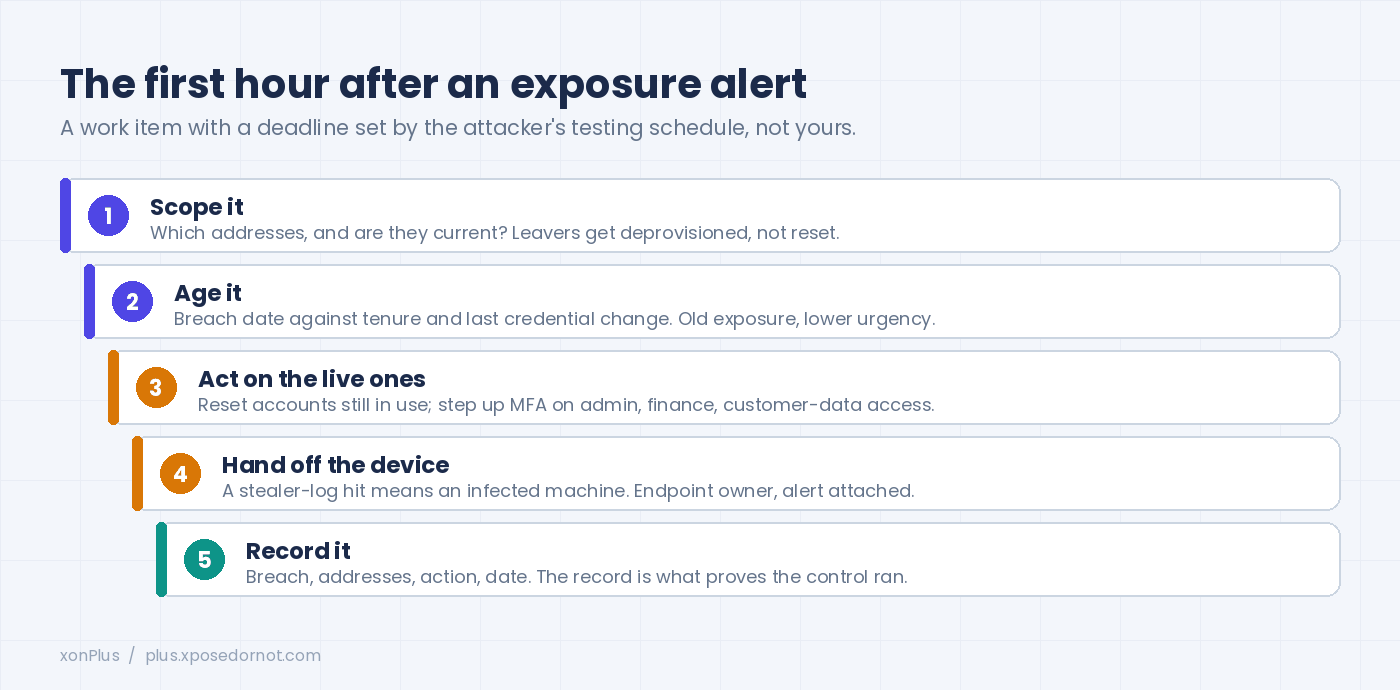
Here is the sequence we see working in customer environments:
- Scope it. Which addresses, and are they current? An address belonging to someone who left eighteen months ago needs deprovisioning, not a reset.
- Age it. Breach date against the person's tenure, and against their last credential change. Exposure that predates their last reset is lower urgency.
- Act on the live ones. Reset the accounts still in use, and turn on or step up multi-factor authentication for any of them with admin, finance, or customer-data access. Hardware keys where the person will actually carry one.
- Hand off the device question. A stealer-log hit means a machine was infected at some point. That belongs to whoever owns endpoints, with the alert attached.
- Record it. Breach name, addresses, action taken, date. Auditors treat continuous exposure monitoring as a live control, and the record is what proves it ran.
Nothing on that list needs a war room. Most of it fits in the same hour the alert arrives, provided the alert lands somewhere people are already looking.
Wiring the alert into what you already watch
An alert that sits in a mailbox nobody opens is a log line. Route it.
The routing options are the ones your team already lives in: a Slack or Teams channel for the security group, a webhook that opens a ticket, or a push into the SIEM so the exposure correlates with sign-in events for the same address. We covered the routing patterns and the timing trade-offs in a separate post; the short form is that a breach ingested at 03:12 should be a posted message and an open ticket by the time someone sits down at 09:00.
If your operations centre runs Microsoft Sentinel or Splunk, the native integrations push each exposure as an event you can write detection rules against. The rule that earns its keep: an exposure alert for an address, followed within days by a successful sign-in for that address from a new device or an unfamiliar country. Either signal alone is noise. Together they are a takeover in progress.
For teams building their own product or workflow, the xonAPI+ endpoints return the domain's exposure picture as JSON, so the check can run on a schedule, at onboarding, or from inside a helpdesk tool. Data is ours, the workflow is yours.
Signals in your own logs, for the ones that get through
Monitoring cuts the first link in the chain. Some attempts still get through, usually when the exposure predates your monitoring. Your authentication logs carry the tells.
A run of failed sign-ins followed by a success. A brand-new device paired with an immediate password change (real people do not do that; they log in and get on with their day). A sign-in from one city followed by another from a different continent within the hour. Both password and recovery email changed in the same session, which is someone locking out the owner. Several accounts touched from one IP address.
Then there is what the account does once it is in. An account that normally does five actions per session doing fifty. Someone skipping their usual pages and heading straight for account settings or payment methods. Bulk downloads. A new shipping address arriving alongside a new card.
None of these is proof on its own. Stack the exposure alert underneath two of them and you have enough to lock the session and ask questions afterwards.
What customers report
Two published case studies, both from customers' own accounts of their deployments.
DigitalTrack, an MSSP serving clients across several industries, replaced analysts' manual checks across multiple breach sources with one daily-refreshed feed into its SOC platform. They report cutting manual breach research by more than 70 per cent, with breach monitoring now part of the core service every client receives.
Invicara, delivering IT for healthcare and construction clients, wired the same feed into its platforms so exposure alerts trigger security policies in client environments. Their information security officer's line stuck with us: the CXO dashboard "gives a clear picture of breach trends and risks."
Both case-study pages close with the same suggestion we make here: run your own domain first and read the list.
Questions security teams ask
Is account takeover monitoring the same as dark web monitoring?
How quickly will we know about a new exposure?
Does this cover addresses we do not know about?
We have multi-factor authentication everywhere. Do we still need this?
How do MSSPs run this for many clients at once?
Start with what is already out there
Every programme we have watched succeed began with the same uncomfortable step: running the domain and reading the list.
Your own domain is free at xposedornot.com/domain , no account needed. Client domains sit in xonThreatIntel+, one picture across every domain you protect. Either way, the first alert you act on is the one that pays for the programme.
Appendix: sources and references
- Catalog figures (781 breaches, 11,612,628,963 records, 780 with email addresses, 516 with passwords, 123 added in 2026 to date) pulled live from the public API on 3 September 2026. Reproduce with the script below. 780 rather than 781 because one entry (Sharecare) carries a truncated data-type label in the API; we are fixing it.
- Revision note: this guide was rewritten on 3 September 2026. The February 2026 version led with login-page controls; this one starts where the exposure starts.
- Median breach-to-surfacing gap of 1,591 days across 776 catalog entries: Breach disclosure lag analysis , XposedOrNot blog, 19 August 2026.
- 299,646,818 unique addresses in the single stealer-log entry (our own extraction, June 2026) and the 499-day gap on that source: Stealer log monitoring for MSSPs, xonPlus blog, 25 August 2026.
- Customer outcomes: DigitalTrack case study and Invicara case study.
- Indexing window (24 to 72 hours) and alert latency (minutes from ingestion): our own operating figures as of September 2026, measured from a catalog entry's addedDate to the outbound alert. Not yet published on a product page; we will link it when it is.
- What we index, and where it comes from: /our-data
Reproduce these numbers
import json, urllib.request

req = urllib.request.Request(
    "https://api.xposedornot.com/v1/breaches",
    headers={"User-Agent": "Mozilla/5.0"})
breaches = json.load(urllib.request.urlopen(req))["exposedBreaches"]

print("breaches:", len(breaches))
print("records:", sum(b["exposedRecords"] for b in breaches))
print("with email addresses:", sum("Email addresses" in b["exposedData"] for b in breaches))
print("with passwords:", sum("Passwords" in b["exposedData"] for b in breaches))
print("added in 2026:", sum(b["addedDate"].startswith("2026") for b in breaches))